

AI for remote teams is no longer just a fancy buzzword; it is the only reason we haven’t all thrown our laptops out the window during the fifth “quick sync” of the day. While we love the freedom of working from anywhere (usually in pajama bottoms), the chaos of coordinating across different time zones often feels like herding cats—digital, invisible cats. But before you schedule another Zoom call that definitely could have been an email, let’s look at how artificial intelligence can silently synchronize your scattered workforce, turning remote chaos into a well-oiled productivity machine.

The Hidden Cost of Remote Misalignment
Remote work offers unparalleled freedom, but it comes with a hidden price tag: synchronization debt. When your team is spread across Istanbul, New York, and Tokyo, you aren’t just battling time zones; you are battling information silos.
According to a recent Microsoft Work Trend Index, 68% of employees complain that they don’t have enough uninterrupted focus time during the workday. Why? Because they are constantly pinged by notifications, updates, and meetings just to stay “in the loop.”
This is where AI for remote teams acts as the great equalizer. It doesn’t just automate tasks; it automates context. It ensures that the developer in London knows exactly what the designer in San Francisco finished three hours ago, without either of them having to jump on a call.
1. Transforming Communication with AI for Remote Teams
The biggest enemy of remote productivity is the “fear of missing out” (FOMO) on information. This leads to over-communication: endless Slack threads and CC’d emails. AI for remote teams solves this by making communication asynchronous yet instant.
The End of “Did You See My Message?”
Modern AI tools like Otter.ai or Microsoft Copilot don’t just record meetings; they understand them.
- Auto-Summarization: Imagine skipping a meeting and receiving a 3-minute bulleted summary of decisions made.
- Sentiment Analysis: AI can analyze the tone of written messages in tools like Slack to prevent misunderstandings before they happen (because “Okay.” can be read in five different ways).
- Translation on the Fly: For global teams, AI tools instantly translate chat messages, breaking down language barriers in real-time.
By implementing AI for remote teams in your communication stack, you shift from “always-on” anxiety to “always-informed” confidence.
2. Syncing Tasks Without the Micro-Management
Nothing kills morale faster than a manager asking, “What’s the status on this?” every four hours. In a traditional office, you can see people working. In a remote setting, visibility is zero.
AI for remote teams brings transparency back without the creepiness of surveillance software.
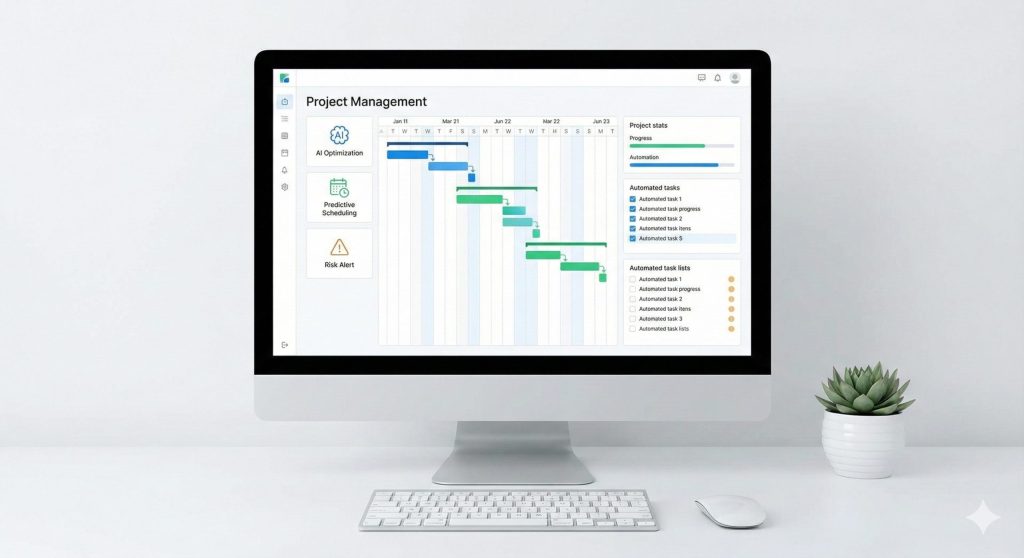
- Predictive Scheduling: AI tools like Motion or Reclaim.ai analyze your team’s calendars and automatically find the best time for deep work or meetings. No more “Are you free at 2 PM?” email ping-pong.
- Smart Prioritization: Instead of a flat to-do list, AI analyzes deadlines and project dependencies to tell each team member exactly what they should work on next to unblock their colleagues.
- Risk Detection: AI algorithms can spot if a project is trending behind schedule weeks before a human manager notices, flagging potential bottlenecks early.
3. Fair Performance Tracking and Burnout Prevention
“One of the darkest sides of remote work is ‘digital presenteeism’—people staying online just to look busy. This leads to burnout. To combat this, you must combine AI tools with clear daily productivity boundaries to protect your mental health.”
Detecting the Smoke Before the Fire
AI-driven analytics tools don’t just count keystrokes (which is toxic); they measure work patterns.
- Burnout Alerts: If an employee suddenly starts sending emails at 11 PM or working on weekends, AI can flag this to a manager as a burnout risk, prompting a check-in.
- Unbiased Reviews: Performance reviews often suffer from “recency bias” (remembering only the last two weeks). AI compiles a year’s worth of data, ensuring that quiet high-performers get the recognition they deserve.
Integrating AI for remote teams into HR processes creates a culture of trust, where performance is based on data, not visibility.
4. Keeping the Culture Alive Digitally
“Culture” is hard to build when you never share a coffee break. However, AI can artificially engineer serendipity.
Tools like Donut or AI-powered bots on Discord/Slack can:
- Matchmake Colleagues: Randomly pair team members for “virtual coffees” based on shared interests (e.g., both love sci-fi movies) found in their profiles.
- Gamify Goals: AI can turn sales targets or coding sprints into a team-based game with leaderboards, injecting fun into the grind.
Using AI for remote teams to foster connection ensures that your employees feel like part of a tribe, not just cogs in a cloud-based machine.
Conclusion: The Future of AI for Remote Teams
Hybrid and remote work models are here to stay. But the companies that thrive won’t be the ones that just buy Zoom licenses; they will be the ones that master synchronization.
Adopting AI for remote teams is not about replacing human interaction. It is about automating the robotic parts of work—scheduling, summarizing, tracking—so that humans have more time to be human.
Stop managing the chaos. Start syncing your success.
FAQs About AI for Remote Teams
Will AI replace remote managers?
No. AI for remote teams acts as a super-assistant, handling data and logistics so managers can focus on coaching and strategy.
Is it expensive to implement these tools?
Most AI features are already built into tools you use (like Notion, Slack, or Zoom), making the barrier to entry very low.
How do we handle privacy concerns?
Always choose enterprise-grade AI tools that guarantee data privacy and never use employee data to train public models without consent.